RACE Developer Guide
This guide documents RACE (Residential Assistant’s Contact Entries). This repository extends the AB3 architecture with additional domain concepts such as room-based resident records, tag registries, comments, and list sorting behaviours that are not present in stock AB3.
When reading older AB3-oriented diagrams or descriptions, interpret them as the high-level structure of the app; refer to the current Model, Storage, and Logic sections for RACE-specific details.
Contributors should prefer updating diagrams and explanations alongside feature changes to avoid documentation drift.
Acknowledgements
- The
commentfeature implementation is adapted from the se-edu tutorial Adding optional fields to AB3.
Setting up, getting started
Refer to the guide Setting up and getting started.
Design
Architecture
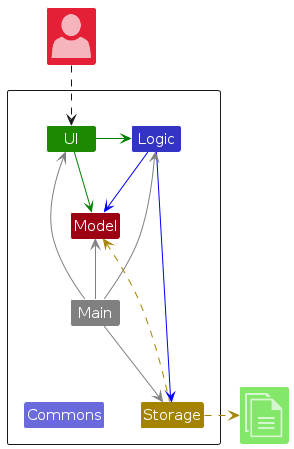
The Architecture Diagram given above explains the high-level design of the App.
Given below is a quick overview of main components and how they interact with each other.
Main components of the architecture
Main (consisting of classes Main and MainApp) is in charge of the app launch and shut down.
- At app launch, it initializes the other components in the correct sequence, and connects them up with each other.
- At shut down, it shuts down the other components and invokes cleanup methods where necessary.
The bulk of the app's work is done by the following four components:
UI: The UI of the App.Logic: The command executor.Model: Holds the data of the App in memory.Storage: Reads data from, and writes data to, the hard disk.
Commons represents a collection of classes used by multiple other components.
How the architecture components interact with each other
The Sequence Diagram below shows how the components interact with each other for the scenario where the user issues the command delete 1.
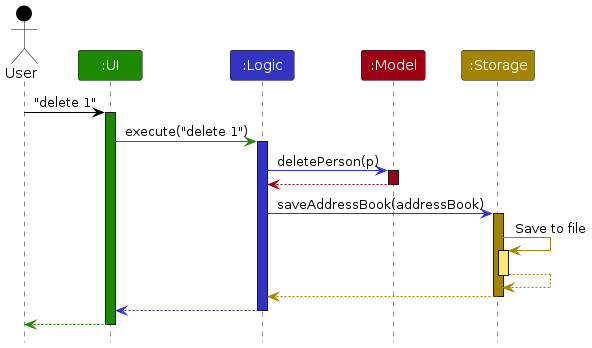
Each of the four main components (also shown in the diagram above),
- defines its API in an
interfacewith the same name as the Component. - implements its functionality using a concrete
{Component Name}Managerclass (which follows the corresponding APIinterfacementioned in the previous point.
For example, the Logic component defines its API in the Logic.java interface and implements its functionality using the LogicManager.java class which follows the Logic interface. Other components interact with a given component through its interface rather than the concrete class (reason: to prevent outside component's being coupled to the implementation of a component), as illustrated in the (partial) class diagram below.
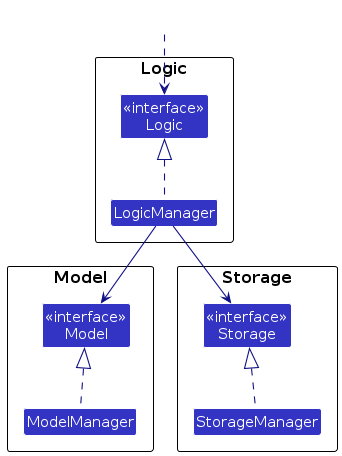
The sections below give more details of each component.
UI component
The API of this component is specified in Ui.java
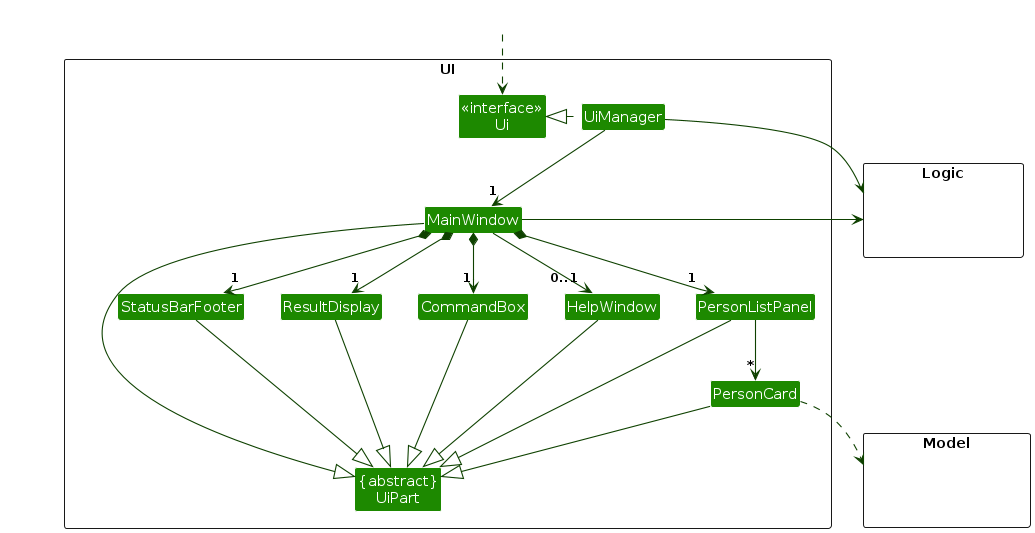
The UI consists of a MainWindow that is made up of parts e.g.CommandBox, ResultDisplay, PersonListPanel, StatusBarFooter etc. All these, including the MainWindow, inherit from the abstract UiPart class which captures the commonalities between classes that represent parts of the visible GUI.
The UI component uses the JavaFx UI framework. The layout of these UI parts are defined in matching .fxml files that are in the src/main/resources/view folder. For example, the layout of the MainWindow is specified in MainWindow.fxml
The UI component,
- executes user commands using the
Logiccomponent. - listens for changes to
Modeldata so that the UI can be updated with the modified data. - keeps a reference to the
Logiccomponent, because theUIrelies on theLogicto execute commands. - depends on some classes in the
Modelcomponent, as it displaysPersonobject residing in theModel. - renders a resident's comment in
PersonCardonly when the comment is non-empty, so empty comments do not take up space in the list view.
Logic component
API : Logic.java
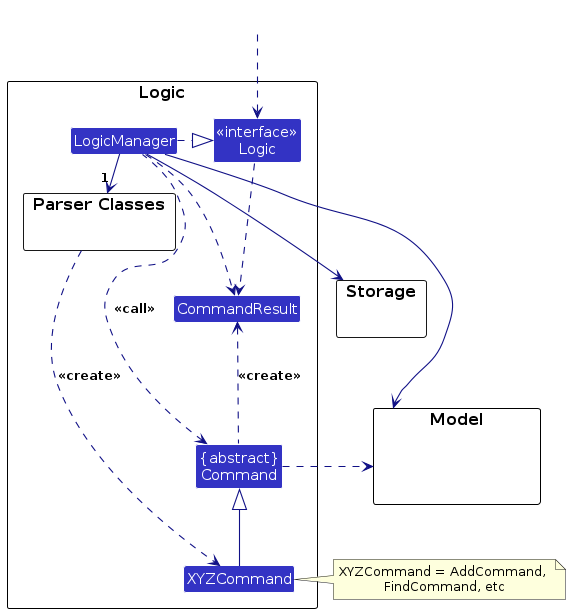
Here's a (partial) class diagram of the Logic component:
The sequence diagram below illustrates the interactions within the Logic
component, taking execute("delete 1,3") as an example.
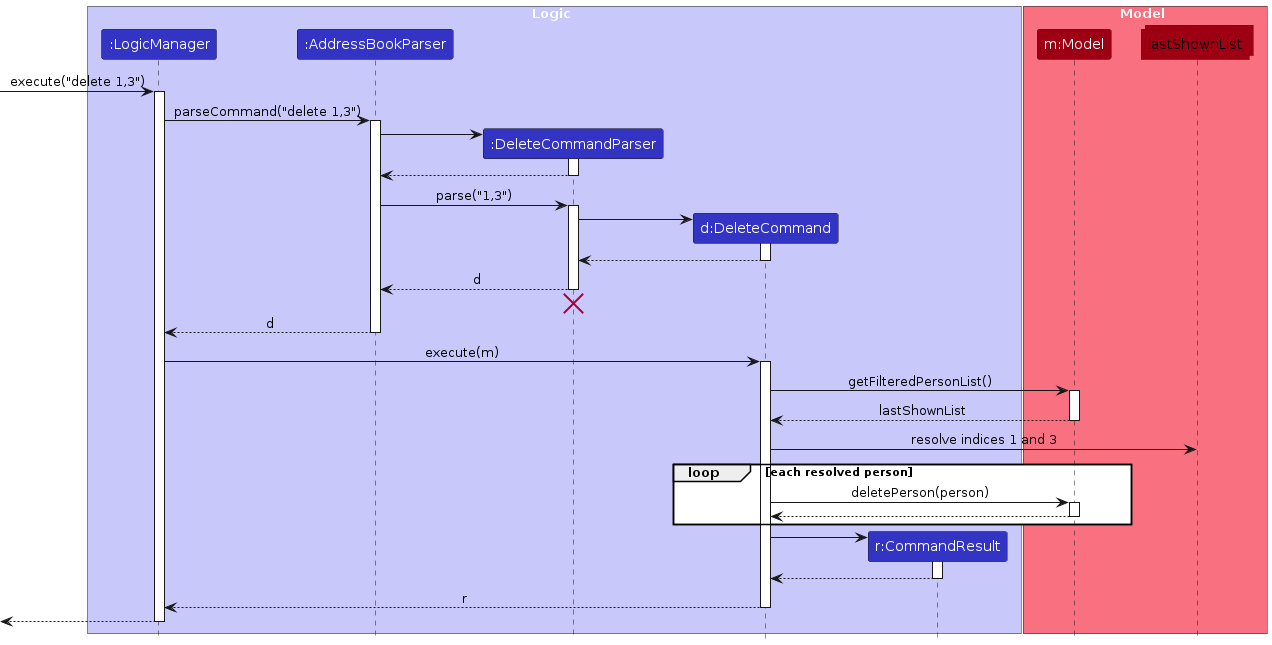
Note: The lifeline for DeleteCommandParser should end at the destroy marker (X) but due to a limitation of PlantUML, the lifeline continues till the end of diagram.
How the Logic component works:
- When
Logicis called upon to execute a command, it is passed to anAddressBookParserobject which in turn creates a parser that matches the command (e.g.,DeleteCommandParser) and uses it to parse the command. - This results in a
Commandobject (more precisely, an object of one of its subclasses e.g.,DeleteCommand) which is executed by theLogicManager. - The command can communicate with the
Modelwhen it is executed (e.g. to delete a person).
Note that although this is shown as a single step in the diagram above (for simplicity), in the code it can take several interactions (between the command object and theModel) to achieve. - The result of the command execution is encapsulated as a
CommandResultobject which is returned back fromLogic.
Here are the other classes in Logic (omitted from the class diagram above) that are used for parsing a user command:
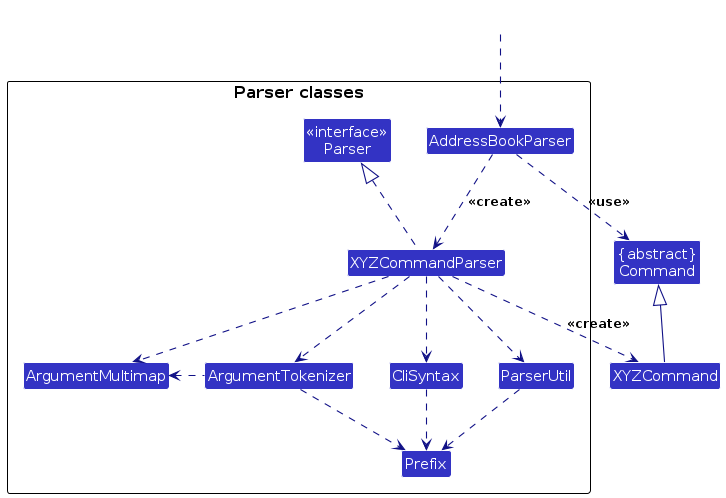
How the parsing works:
- When called upon to parse a user command, the
AddressBookParserclass creates anXYZCommandParser(XYZis a placeholder for the specific command name e.g.,AddCommandParser) which uses the other classes shown above to parse the user command and create aXYZCommandobject (e.g.,AddCommand) which theAddressBookParserreturns back as aCommandobject. - All
XYZCommandParserclasses (e.g.,AddCommandParser,DeleteCommandParser, ...) inherit from theParserinterface so that they can be treated similarly where possible e.g, during testing.
Model component
API : Model.java
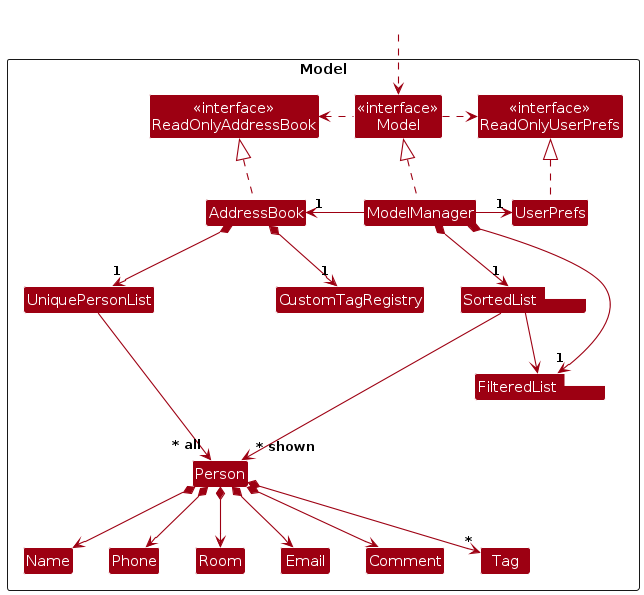
The Model component,
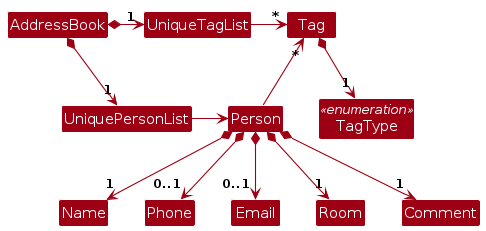
- stores the address book data i.e., all
Personobjects (which are contained in aUniquePersonListobject). EachPersonstores immutable values forName,Phone,Email,Room,Comment, and tags. - stores a
CustomTagRegistryinsideAddressBookto track known custom tags separately from eachPerson, while still treating built-in tags as always known. - treats tag names as exact, case-sensitive values. There is no automatic tag normalization; kebab-case is a usage convention rather than a storage rule.
- stores the currently 'selected'
Personobjects (e.g., results of a search query) as a separate filtered list which is exposed to outsiders as an unmodifiableObservableList<Person>that can be 'observed' e.g. the UI can be bound to this list so that the UI automatically updates when the data in the list change. - stores a
UserPrefsobject that represents the user’s preferences. This is exposed to the outside as aReadOnlyUserPrefsobject. - does not depend on any of the other three components (as the
Modelrepresents data entities of the domain, they should make sense on their own without depending on other components)
Note: An alternative (arguably, a more OOP) model is given below. It has a Tag list in the AddressBook, which Person references. This allows AddressBook to only require one Tag object per unique tag, instead of each Person needing their own Tag objects.
Storage component
API : Storage.java
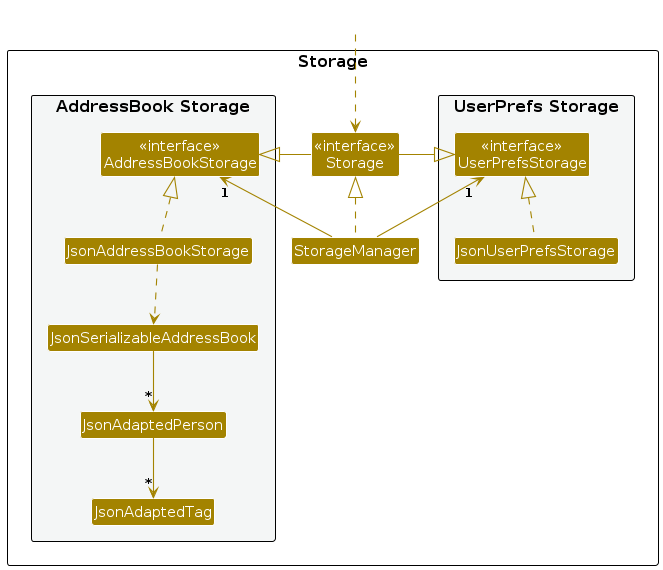
The Storage component,
- can save both address book data and user preference data in JSON format, and read them back into corresponding objects.
- persists each person's comment in the JSON data file and loads missing
commentfields as empty comments to preserve compatibility with older saved data. - persists the custom tag registry separately as
customTags, while also rebuilding missing custom-tag entries from loaded persons so the in-memory model stays usable even if the file is stale. - surfaces address-book load outcomes to the UI so the result display can show whether saved data, sample data, or an empty address book was loaded on startup.
- inherits from both
AddressBookStorageandUserPrefStorage, which means it can be treated as either one (if only the functionality of only one is needed). - depends on some classes in the
Modelcomponent (because theStoragecomponent's job is to save/retrieve objects that belong to theModel)
Common classes
Classes used by multiple components are in the seedu.address.commons package.
Implementation
This section describes some noteworthy details on how certain features are implemented.
Sorting Feature
Implementation
The sorting feature is integrated into the list command. It allows users to
view all residents ordered by a chosen field (name or room).
The implementation relies on JavaFX's SortedList, which is initialized in ModelManager to wrap around the filteredPersons list. This architectural choice ensures that whenever the filter changes (e.g., via find), the sort order can still be applied to the filtered subset.
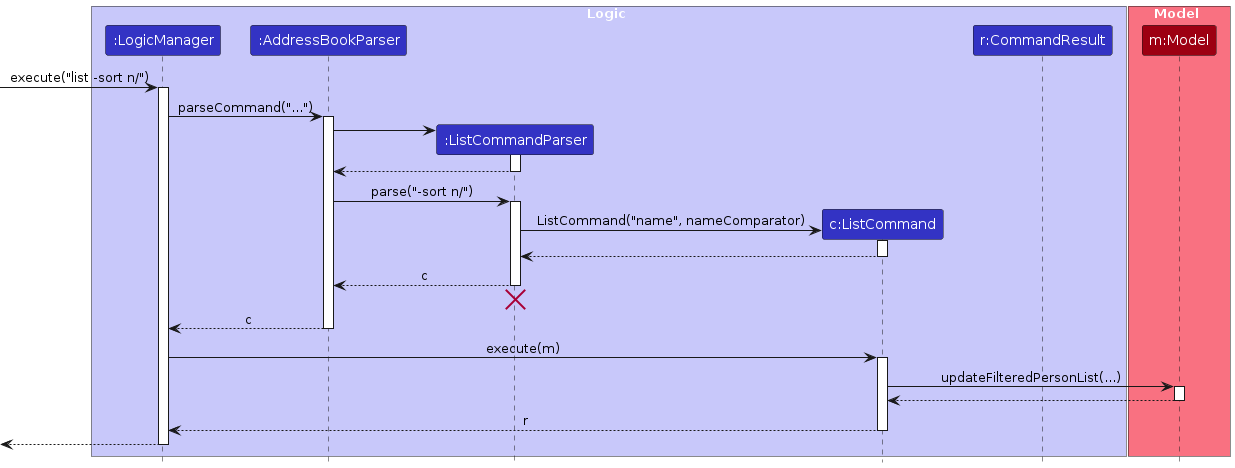
ListCommandParseridentifies the-sortoption and maps supported field prefixes (n/,r/) to a correspondingComparator<Person>.ListCommandis created with the field name and its comparator.- Upon execution,
ListCommandcallsModel#updateFilteredPersonList(Predicate, Comparator). ModelManagersets the filter on itsFilteredListand the comparator on itsSortedList.- Sorting is only applied when a command calls
Model#updateFilteredPersonList(Predicate, Comparator). Commands that use the single-argument overload reset the sort comparator tonull; this includes plainlist,find, and commands such asaddandcommentthat refresh the shown list throughupdateFilteredPersonList(PREDICATE_SHOW_ALL_PERSONS).
The following sequence diagram shows the main interactions for list -sort n/.
Design considerations
Aspect: How sorting interacts with filtering
- Choice (current): Sort order is reset by
findand plainlist, but preserved byaddafter a priorlist -sort <prefix>/.- Pros: Predictable behavior; users always see the list state they explicitly requested.
- Cons: Users cannot "keep" a sort order while performing multiple different searches without re-specifying the sort field.
Tag management
Implementation
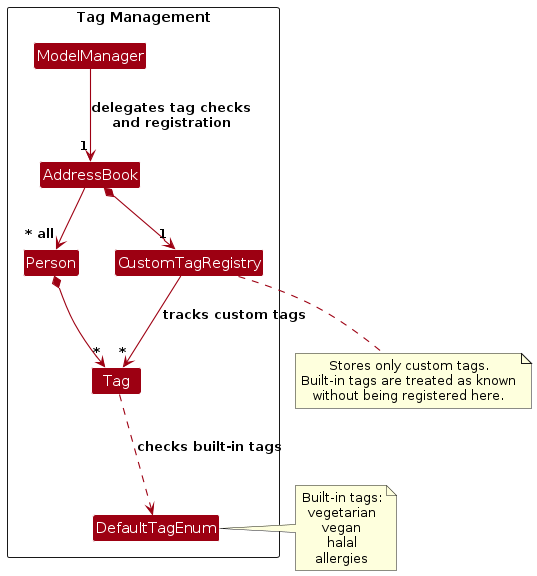
The tag model separates three concerns: tag identity, built-in tag definitions, and custom-tag existence.
Tagremains an immutable value object that stores the displayed tag name and uses exact string equality. This makes tag behavior predictable:study-groupandStudy-Groupare different tags.DefaultTagEnumdefines the built-in tags (vegetarian,vegan,halal,allergies). These are treated as known immediately, but they follow the same case-sensitive matching rule as custom tags.CustomTagRegistrystores the currently known custom tags in anAddressBook, and its lookup logic also treats built-in tags as known immediately. This keeps "does this tag exist already?" in the model layer instead of insideTag.addandeditonly register unknown custom tags when the user explicitly supplies-newtag. Without that flag, both commands reject unknown tags consistently.- Shared helpers,
ParserUtil.parseBooleanFlag(...)andTagCommandUtil.validateKnownTags(...), keep-newtagparsing and tag validation aligned betweenaddandedit. - During loading and person updates,
AddressBookalso registers custom tags found on persons. This keeps the in-memory registry consistent even if the storedcustomTagslist is incomplete.
The following class diagram summarizes the main classes involved in tag management.
Design considerations
Aspect: Where tag existence should be tracked
- Choice (current): Store tag existence in
CustomTagRegistry, whileTagonly represents a value.- Pros: Keeps the value object simple and reusable; avoids spreading tag-existence logic across commands and model classes.
- Cons: Introduces one more model concept that must stay synchronized with resident data.
Aspect: How tag casing should work
- Choice (current): Use exact, case-sensitive tag identity for both built-in and custom tags.
- Pros: Matches a branch-like mental model; avoids hidden normalization or silent rewriting of user input.
- Cons: Makes near-duplicate tags easier to create if users are inconsistent with capitalization.
Aspect: How to handle incomplete customTags data from storage
- Choice (current): Repair the registry in memory from loaded persons, and persist the repaired registry on the next successful save.
- Pros: Keeps runtime behavior correct without adding immediate load-time writeback.
- Cons: The JSON file can remain temporarily stale until a later successful command triggers saving.
Documentation, logging, testing, configuration, dev-ops
Appendix: Requirements
Product scope
Target user profile:
Felix is a Year 3 Soc student and RA at Acacia College. Approachable and proactive, he enjoys connecting with residents and planning events for them regularly. He loves his terminal. However, he has poor memory and gets overwhelmed during orientation, because of the messy process of onboarding residents and collecting data.
Value proposition: RACE provides a single, dedicated system to manage resident details safely, keeping sensitive information private. During orientation, RAs must onboard 40+ residents quickly, and RACE helps to manage resident information efficiently, instead of current scattered and slow workflows.
User stories
- As a beginner, new RA, I can add a resident with the required details, so that I can register residents quickly during onboarding.
- As an expert, RA handling a busy intake, I can add a resident even if some optional fields are missing, so that incomplete data does not block onboarding.
- As an intermediate, RA, I can tag residents with labels (e.g., allergy, athlete, international), so that I can group them easily.
- As an intermediate, RA, I can create a new custom tag while adding or editing a resident, so that I can record categories that are specific to my hall or event.
- As a beginner, RA, I can view a list of all registered residents, so that I can see who is currently in the system.
- As a beginner, RA, I can sort residents alphabetically or by room number, so that I can browse faster and make block checks easier.
- As a beginner, forgetful RA, I can search using partial information, so that I do not have to attain all information to pinpoint a resident quickly.
- As a beginner, RA, I can update resident details, so that the information stays accurate over time.
- As an intermediate, RA, I can replace or clear a resident's tags, so that outdated group labels do not remain in the record.
- As an expert, RA, I can add, edit or clear a private comment for a resident, so that I can keep follow-up notes without changing the resident's main details.
- As a beginner, RA, I can remove resident records that are no longer needed, so that my records do not become cluttered.
- As an expert, RA managing semester turnover, I can delete multiple residents at once, so that I can clean up the list more efficiently.
- As an expert, RA preparing for a new intake cycle, I can clear all resident records, so that I can reset the app quickly for a new semester.
- As a beginner, new RA, I can understand what the system is meant to help me do (e.g. user manual), so that I know how it supports my role.
- As a beginner, busy RA, I can have my data saved automatically after successful commands, so that I do not lose updates if I close the app.
Priorities: High (must have) - * * *, Medium (nice to have) - * *, Low (unlikely to have) - *
| Priority | As a … | I want to … | So that I can… |
|---|---|---|---|
* * * | beginner, new RA | add a resident with required details | register residents quickly during onboarding |
* * * | expert, RA handling a busy intake | add a resident even if some optional fields are missing | incomplete data does not block onboarding |
* * * | beginner, RA | view a list of all registered residents | see who is currently in the system |
* * * | beginner, forgetful RA | search using partial information | not have to attain all information to pinpoint a resident quickly |
* * * | beginner, RA | update resident details | the information stays accurate over time |
* * * | expert, RA | add, edit or clear a private comment for a resident | keep follow-up notes without changing the resident's main details |
* * * | beginner, RA | remove resident records that are no longer needed | my records do not become cluttered |
* * * | beginner, new RA | understand what the system is meant to help me do (e.g. user manual) | know how it supports my role |
* * | intermediate, RA | tag residents with labels (e.g., allergy, athlete, international) | group them easily |
* * | intermediate, RA | create a new custom tag while adding or editing a resident | record categories specific to my hall or event |
* * | beginner, RA | sort residents alphabetically or by room number | browse faster and make block checks easier |
* * | intermediate, RA | replace or clear a resident's tags | remove outdated group labels from the record |
* * | expert, RA managing semester turnover | delete multiple residents at once | clean up the roster more efficiently |
* * | expert, RA preparing for a new intake cycle | clear all resident records | reset the app quickly for a new semester |
* * | beginner, busy RA | have my data saved automatically after successful commands | not lose updates if I close the app |
* | expert | append notes instead of overwriting them | history is preserved |
* | expert | check if a specific number of residents have been recorded in certain floors | no one is accidentally left out |
* | expert | limit list output to the first N entries | terminal output stays readable |
* | intermediate | select specifically residents who have signed up for an activity and review their details | I feel prepared and can cater to their needs |
* | intermediate | notice missing or incomplete resident information | I know who to follow up with |
* | intermediate | see at a glance residents with special needs | I can be inclusive |
* | intermediate | list all residents under a tag | I can plan targeted outreach |
* | intermediate | filter residents based on specific criteria | I can find relevant groups easily |
* | intermediate | hide certain columns | I can see the fields I want to see at one point more easily |
* | beginner | focus on entering information without visual distractions | I make fewer mistakes |
* | beginner | mark certain fields as sensitive | they are hidden in summary views |
* | beginner | hide certain private information from immediate view | sensitive data is protected |
* | beginner | use command shortcuts | frequent actions are faster |
* | beginner | reuse my last command with small edits | repeated onboarding is efficient |
Use cases
(For all use cases below, the System is the AddressBook and the Actor is the user, unless specified otherwise)
Use case: Delete a person
MSS
User requests to list persons
AddressBook shows a list of persons
User requests to delete a specific person in the list
AddressBook deletes the person
Use case ends.
Extensions
2a. The list is empty.
Use case ends.
3a. The given index is invalid.
3a1. AddressBook shows an error message.
Use case resumes at step 2.
Use case: Add or clear a resident comment
MSS
User requests to list residents or find a resident.
System shows a list of residents with their indices.
User requests to add a comment to a specific resident in the list.
System updates the resident's comment.
System shows the updated resident list.
Use case ends.
Extensions
2a. The list is empty.
Use case ends.
3a. The given index is invalid.
3a1. System shows an error message.
Use case resumes at step 2.
3b. The user provides
c/with no text.3b1. System clears the resident's existing comment.
Use case ends.
Use case: Batch Onboarding
MSS
User requests to list all residents to check current occupancy.
System shows a list of residents.
User requests to add a new resident with mandatory and optional fields.
System validates the data and adds the resident to the database.
User requests to add another new resident with mandatory and optional fields.
System adds the second resident.
User verifies the new list.
Use case ends.
Extensions
- 3a. The room number is already assigned to another resident.
- 3a1. System shows an error message.
- Use case resumes at step 3.
- 3b. User input is invalid.
- 3b1. System shows an error message regarding the format.
- Use case resumes at step 3.
Use case: Search for Resident During Emergency
MSS
User requests to find residents using one or more keywords.
System shows a filtered list of matching residents with their indices.
User identifies the correct resident and room number from the results.
User requests to update the resident's phone number to the latest provided.
System updates the record and confirms the change.
Use case ends.
Extensions
- 1a. No residents match the keyword.
- 1a1. System shows
0 persons listed!. - Use case ends.
- 1a1. System shows
- 1b. The search keyword is too broad (e.g., >200 matches).
- 1b1. User refines search.
- Use case resumes at step 1.
Use case: Mid-Semester Room Swap
MSS
User requests to find the two residents involved in the swap.
System shows the current records for both residents.
User requests to update Resident A to a temporary placeholder room.
User requests to update Resident B to Resident A’s original room.
User requests to update Resident A to Resident B’s original room.
System confirms all updates are successful.
Use case ends.
Extensions
- 3a. The user attempts to move a resident into an occupied room without using a placeholder.
- 3a1. System shows a duplicate room error.
- Use case resumes at step 3.
Use case: Bulk Removal of Graduating Residents
MSS
User requests to list all residents.
System shows the full list.
User requests to delete multiple residents by providing comma-separated indices.
System validates all provided indices.
System removes all specified records in one command.
Use case ends.
Extensions
- 3a. At least one provided index is invalid.
- 3a1. System shows an error message and aborts the command.
- Use case resumes at step 2.
Use case: Managing Medical/Special Needs
MSS
User requests to find residents with a specific tag (e.g., "asthma").
System shows a list of residents matching the tag.
User requests to view the full details of a specific resident.
User requests to add a new specific dietary tag to that resident’s record.
System updates the resident record with the new tag.
Use case ends.
Extensions
- 1a. No residents are found with that tag.
- 1a1. System shows an empty list or "No residents found."
- Use case ends.
- 4a. The user provides an invalid index for the update.
- 4a1. System shows an error message.
- Use case resumes at step 2.
Non-Functional Requirements
- Should work on any mainstream OS as long as it has Java
17or above installed. - Should be able to hold up to 1000 persons without a noticeable sluggishness in performance for typical usage.
- A user with above average typing speed for regular English text (i.e. not code, not system admin commands) should be able to accomplish most of the tasks faster using commands than using the mouse.
- Should respond to most user commands within 2 seconds for typical usage involving up to 40 resident records.
- Should store all resident information locally on the user’s device and should not require an internet connection to perform any core features.
- Should provide clear and informative error messages when the user enters an invalid command or incorrect parameters.
- Should preserve all stored resident data between application restarts, unless the user explicitly deletes the data.
- Should allow users to recover the application state from saved data files without manual editing of the data files.
- Should keep command output readable within a standard terminal window width (e.g., ~120 characters).
Glossary
- Mainstream OS: Windows, Linux, Unix, MacOS
- Private contact detail: A contact detail that is not meant to be shared with others
- Resident: A person living in the residential college whose information is stored and managed by the system. Each resident record may include fields such as name, room number, and other optional details.
- Resident Assistant (RA): The primary user of the application who manages resident information, performs onboarding, and maintains records throughout the semester for a batch of residents living in the residential college.
- Comment: A free-form note stored with a resident record for short contextual information such as follow-ups or special reminders.
- User's Preferences (UserPref): Settings related to the application environment (e.g., window size or file paths) that are saved locally and loaded when the application starts.
- JSON: JSON (JavaScript Object Notation) is the data format used by the application to store resident information and user preferences on disk.
- Index: The number used by commands (e.g.,
delete 1) to identify a resident from the currently displayed list. - GUI (Graphical User Interface): The visual interface of the application, built using JavaFX, which allows users to interact with the system through visual components.
Appendix: Instructions for manual testing
Given below are instructions to test the app manually.
Note: These instructions only provide a starting point for testers to work on; testers are expected to do more exploratory testing.
Launch and shutdown
Initial launch
Download the jar file and copy into an empty folder
Double-click the jar file Expected: Shows the GUI with a set of sample contacts. The window size may not be optimum.
Saving window preferences
Resize the window to an optimum size. Move the window to a different location. Close the window.
Re-launch the app by double-clicking the jar file.
Expected: The most recent window size and location is retained.
Sorting residents
- Sorting residents by different fields
Prerequisites: Multiple residents with different names, rooms, and phone numbers.
Test case:
list -sort r/
Expected: List is updated to show all residents sorted by room number (format: #BLOCK-ROOM[-LETTER]). Status message confirms sorting.Test case:
list -sort x/
Expected: No sorting occurs. Error message "Invalid sort field! Supported field prefixes: n/, r/" is displayed.
Deleting a person
- Deleting a person while all persons are being shown
Prerequisites: List all persons using the
listcommand. Multiple persons in the list.Test case:
delete 1
Expected: First contact is deleted from the list. Details of the deleted contact shown in the status message. Timestamp in the status bar is updated.Test case:
delete 0
Expected: No person is deleted. Error details shown in the status message. Status bar remains the same.Other incorrect delete commands to try:
delete,delete x,...(where x is larger than the list size)
Expected: Similar to previous.
Editing a person's comment
- Adding or clearing a comment while all persons are being shown
Prerequisites: List all persons using the
listcommand. Multiple persons in the list.Test case:
comment 1 c/Requires wheelchair-accessible venue
Expected: The first person's comment is updated. The success message is shown in the result display. The person card shows the new comment.Test case:
comment 1 c/
Expected: The first person's comment is removed. The success message is shown in the result display. The comment label is no longer shown on the person card.Other incorrect comment commands to try:
comment,comment 1,comment 0 c/test,comment x c/test,comment 1 c/first c/second
Expected: No person's comment is changed. Error details are shown in the result display.
Saving data
Autosaving after a successful command
Prerequisites: App has been launched at least once in a test folder.
Test case:
add n/Test Resident r/#09-101and then close the app.
Re-launch the app.
Expected: The newly added resident is still present in the list. The filedata/addressbook.jsonexists in the app folder and contains the new resident record.Test case:
add n/Another Resident r/#09-102, then enter an invalid command such asdelete 999999.
Expected: The invalid command shows an error message and does not modify saved data. After closing and re-launching the app,Another Residentis still present and no unintended changes have been made.
Dealing with a missing data file
Prerequisites: Close the app. In the app folder, ensure
data/addressbook.jsondoes not exist by deleting it or moving it elsewhere.Test case: Launch the app in that folder.
Expected: The app starts successfully and shows the sample residents in the GUI.Test case: After launch, execute a successful command such as
listoradd n/Test Resident r/#10-101.
Expected: A newdata/addressbook.jsonfile is created in the app folder.
Dealing with a corrupted data file
Prerequisites: Close the app. Open
data/addressbook.jsonin a text editor and replace its contents with invalid JSON such as{ invalid json.Test case: Launch the app.
Expected: The app starts successfully with an empty resident list instead of crashing, because invalid stored data cannot be loaded.Test case: Execute a successful command such as
add n/Recovered Resident r/#11-111.
Expected: The app saves normally again, anddata/addressbook.jsonis replaced with a valid file containing the new resident data.
Appendix: Planned Enhancements
Team size: 5
- Restore the existing Help window when
helpis run while it is minimised: currently, runninghelpagain can appear to do nothing if the Help window is minimised. We plan to change this so the same Help window is restored, brought to the front, and focused instead of remaining hidden. - Identify the offending index in bulk deletion failures: currently, if
delete 1,3,999fails, the message does not clearly tell the user which index caused the command to be rejected. We plan to report the specific invalid index and clarify that no residents were deleted. - Make unsupported-prefix errors in
addandeditmore accurate: currently, unsupported prefixes such asc/inadd n/Amy r/#01-01 c/testmay be absorbed into another field and trigger a misleading room or tag format error. We plan to detect unsupported prefixes explicitly and report them directly, e.g.Unsupported prefix in add command: c/. - Allow both AND logic and OR logic in the
findcommand: currently,finduses OR logic across all keywords, so users cannot require multiple conditions in one search. We plan to extendfindso users can express AND conditions explicitly, while keeping OR searches available, e.g.find John AND Doeorfind John AND 14-203. - Shorten overly verbose startup load errors while preserving useful details: currently, the app shows the original storage/parser error in the result display on startup so users are not left without feedback. Empty files are treated like missing data files and load sample residents, but malformed JSON can still produce a very long message because the raw parser output may include file excerpts, line numbers, and column numbers. We plan to keep the useful location details while shortening the displayed message, and move the full raw error to logs or an expandable UI.
- Accept more valid room formats to account for more residences: currently, the room validation rules are stricter than some real residence naming schemes. We plan to expand accepted room formats so legitimate inputs from other residences can be stored without workarounds, while still rejecting malformed room entries. This includes accepting room inputs that omit the leading
#by automatically prepending it during parsing, and treating alphabetic room suffixes case-insensitively so inputs such as#14-203-dand14-203-Dare accepted consistently. - Allow names that contain prefix-like text such as
p/inside the actual name: currently, names likeChloe p/o Tancan be misread becausep/is treated as the phone prefix. We plan to refine parsing so such names can be entered normally without the command being split atp/. - Allow duplicate legal names by automatically appending a stored qualifier: currently, residents with the same legal name cannot both be added. We plan to allow the second and subsequent duplicates by automatically appending a distinguishing qualifier such as
Alex Tan (Block 14)to the stored display name so each resident record remains uniquely identifiable. - Add a confirmation pop-up before
clearremoves all residents: currently,clearexecutes immediately and permanently. We plan to show a confirmation dialog that states all resident records will be deleted and only proceed when the user explicitly confirms. - Make the command box behave more like a terminal after execution: currently, the previous command text remains in the input box after a command runs. We plan to clear the command box after each submission, while also adding up-arrow and down-arrow history navigation so users can cycle through previous commands when they want to reuse or edit them.